WordPress: How to Fix Styles
Jottler does not provide template styles. It outputs clean HTML, and your WordPress template/theme determines the final appearance of blog posts.
Why styling can look off
If posts look unstyled, it is usually a WordPress theme CSS issue, not a content issue. This is common with many WP templates and can be fixed with custom CSS.
Where to add CSS in WordPress
In your WordPress dashboard, go to:
Appearance -> Customize -> Additional CSS
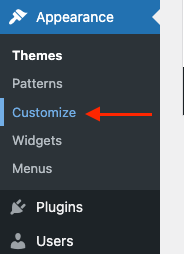
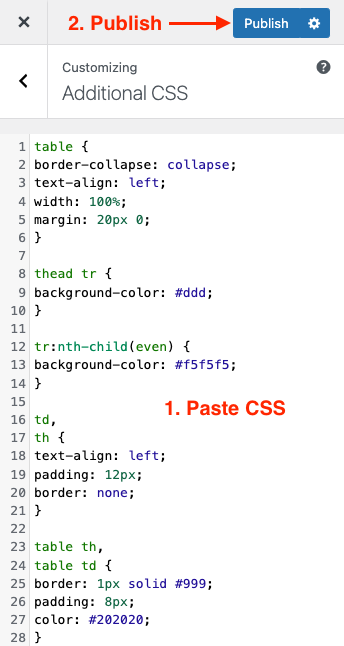
Table styles - Light Theme
table {
border-collapse: collapse;
text-align: left;
width: 100%;
margin: 20px 0;
}

thead tr {
background-color: #ddd;
}

tr:nth-child(even) {
background-color: #f5f5f5;
}

td,
th {
text-align: left;
padding: 12px;
border: none;
}

table th,
table td {
border: 1px solid #999;
padding: 8px;
color: #202020;
}
Table styles - Dark Theme
table {
border-collapse: collapse;
text-align: left;
width: 100%;
margin: 20px 0;
}

thead tr {
background-color: #555;
}

tr:nth-child(even) {
background-color: #333;
}

td,
th {
text-align: left;
padding: 12px;
border: none;
}

table th,
table td {
border: 1px solid #444;
padding: 8px;
color: #fff;
}
Verification checklist
- Save CSS changes.
- Refresh your article page.
- Clear WP cache/CDN cache if styles do not update immediately.
- Adjust colors to fit your site theme.